
October 24, 2026
WebSockets vs. Telegram Alerts - Two Very Different Ways to Get the Same Signals
Same four models, same thresholds, two delivery mechanisms built for completely different jobs
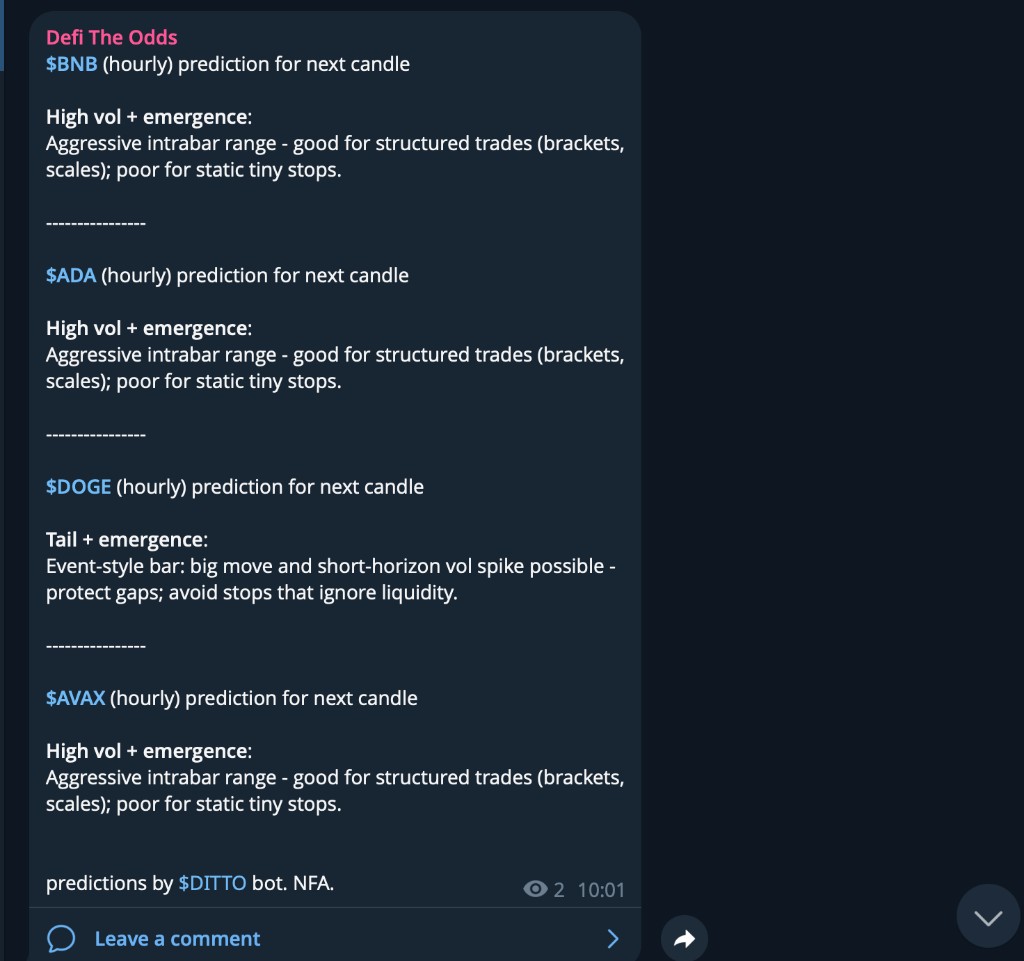
We just shipped a real-time WebSocket feed, which means there are now two ways to find out when one of our models thinks something is brewing: a Telegram channel, and a WebSocket connection. They sound like the same feature with two front doors. They're not. They're built on the same underlying logic, but they make opposite tradeoffs, and picking the wrong one for the job will either flood you with noise or leave you waiting for a ping that was never going to come.
Here's what's actually happening behind each one, and how to decide which belongs in your setup - or whether you want both.
What the Telegram channel actually does
The public channel runs on a cron job, not a live connection. Every hour, at one minute past, a job wakes up and checks the latest closed candle for a curated list of 20 tickers (the top 20 by market presence, out of the 50 we actually track - more on that gap below). For each ticker, it runs one check:
Is
tail_risk_conf,high_vol_conf,regime_change_conf, orregime_emergence_confabove 90%? Or isfuture_volabove 5% andexpansion_probabilityabove 90%?
If nothing qualifies for any of the 20 tickers that hour, nothing gets posted. No "all clear," no heartbeat, no empty message - silence. If one or more tickers do qualify, they get batched into a single message and posted to the channel, each with a plain-English read pulled from the same 16-message lookup table that powers the API's candle interpretation - the screenshot above is a real example from the channel: four tickers crossed threshold in the same hourly cycle, so they shipped as one message instead of four.
That's the whole mechanism. It's deliberately a high-pass filter: most hours, most tickers, nothing happens, and the channel stays quiet. The same job runs once a day for daily candles. No API key required, nothing to configure - you join, you read.
What the WebSocket feed actually does
The WebSocket is the opposite design: it doesn't filter anything, and it isn't a channel you glance at - it's a firehose you're expected to write code against.
You open one persistent connection to wss://api.defitheodds.xyz/ws, authenticate with your API key, and subscribe to one or more of four channels: hourly, daily, high_confidence_hourly, high_confidence_daily. By default that's every new candle insert for all 50 tracked tickers, pushed to you the instant it lands in the database - there's no polling delay, no cron tick to wait for. hourly/daily hand you the raw enriched row. The high_confidence_* channels hand you the same row with one field added: msg, the same plain-English read the Telegram bot uses.
You don't have to take all 50, though - you can pass an optional tickers array in the same message to narrow a subscription down to exactly the symbols you care about, say just BTC-USD and ETH-USD:
const ws = new WebSocket('wss://api.defitheodds.xyz/ws');

ws.onopen = () => {
  ws.send(JSON.stringify({
    token: 'dfo_your_api_key_here',
    channels: ['high_confidence_hourly'],
    tickers: ['BTC-USD', 'ETH-USD'],
  }));
};

ws.onmessage = (event) => {
  const candle = JSON.parse(event.data);
  if (candle.tail_risk_conf > 0.9 || candle.high_vol_conf > 0.9) {
    // now you're looking at what Telegram would have posted,
    // but only for the tickers you actually asked for
  }
};
Omit tickers and you're back to the full 50. That filtering happens server-side on ticker, not on confidence - the channel name still oversells itself a little: high_confidence_* fires on every candle for whichever tickers you subscribed to, including the ones where nothing is happening, which just get a baseline "no strong signal" message instead of a specific read. If you want Telegram's quiet-unless-it-matters behavior - only hearing about it when a confidence field actually crosses a line - that part is still on you to check client-side, same as in the example above. The socket narrows which tickers you see; it's still not curating when something's worth acting on.
Full protocol, every channel, and real message examples are on the docs page.
Side by side
| Telegram channel | WebSocket | |
|---|---|---|
| Delivery | Batched message, posted hourly/daily on a cron | Pushed the instant a candle is written |
| Coverage | Fixed curated top 20 of the 50 tracked tickers | All 50 by default, or any subset via tickers |
| Filtering | Only posts when a threshold is actually crossed | Fires on every candle for your tickers; confidence filtering is on you |
| Format | Human-readable text, one message per hour/day | Structured JSON, one message per event |
| Access | Free, public, no account needed | Requires an API key on the Pro or AI plan |
| Built for | Reading | Parsing |
Where each one actually fits in a process
Telegram is for staying ambiently aware without writing anything. If you're a discretionary trader watching 5-10 majors and you don't want to tab back into a dashboard every 20 minutes, the channel is a reasonable background process: a 90% confidence bar across four fields means most hours pass without a post, and when one does land, that's specifically because something crossed a line worth a second look. Treat it the way you'd treat a smoke detector, not a stock ticker - it tells you to go check something, not what to do about it. You still pull up the full candle (via the API or the dashboard) before deciding anything.
The WebSocket is for code that has to react, or that needs the "nothing happening" state too. A few concrete shapes this takes:
- Dynamic stop-loss width. A bot holding a position doesn't care about alerts - it needs to know on every single candle whether
future_voljust moved, so it can widen or tighten a stop. The "nothing happening" candles matter here as much as the exciting ones; silence is data, not noise, when you're the one deciding what to do with it. - A live sector dashboard. The Intelligence API gives you sector-relative performance on request; the WebSocket is what keeps that view current without you polling it on a timer.
- Your own filtered alerting. Maybe you want Telegram's curated feel but for a different watchlist, a different confidence threshold, or a different destination (Discord, a Slack webhook, SMS). Subscribe with
tickersset to exactly the symbols you care about, then apply your own confidence check on top - the code example above is roughly the whole job.
What you shouldn't do with either one: treat a message - from either channel - as a trade signal. Every field involved here measures risk and volatility, not direction. A tail_risk_conf spike means a bigger-than-usual move is likely, not which way it's going. That's true whether it reaches you as a Telegram message or a JSON payload.
The honest gaps
A couple of things worth knowing before you build around either one:
- Telegram's 20-ticker list is a deliberate subset, not the full catalog - it exists to keep a free, public channel from turning into 50 tickers' worth of noise. If you need signal on tickers outside that list, the WebSocket (or the REST
/hourly//dailyendpoints) is the only way to get it. - The WebSocket has no built-in reconnect. If the connection drops, your client needs to notice and re-authenticate/re-subscribe itself - it won't happen for you.
- Both the Telegram bot and the WebSocket's
high_confidence_*channels are reading from the exact same 16-message lookup table and the same 0.9/0.05 thresholds under the hood, so you won't get a different "opinion" out of one versus the other for the same candle - just a different delivery mechanism and a different amount of filtering on top.
Picking one
If you just want to know when something's worth a look, without writing a line of code, the Telegram channel already does that today, for free. If you're building something that needs to act on data rather than read it - a bot, a dashboard, your own alerting logic - that's what the WebSocket is for, and it's part of the Pro plan along with the full 50-ticker catalog and the Intelligence API. Worth a look if the free tier's two tickers and 100 requests a day are starting to feel like the ceiling rather than a sandbox.
Not investment advice. NFA.